
Business Rules For User Interfaces
Business Decisions Should Not Live In User Interface Code
Most applications contain thousands of business decisions that directly influence field visibility, validations, workflows and user interactions.
When these decisions are implemented in frontend code, they become difficult to maintain, duplicate across systems and require software releases for every change.
CLE externalizes business decisions and delivers decision outcomes through APIs. User interfaces simply consume the results.
These business decisions are executed by the CLE Decision Engine API.
Keep the application. Replace the hard-coded logic.
User Interfaces Are Full Of Business Decisions
Most organizations assume user interfaces are primarily about layout and design.
In reality, business applications contain large amounts of decision logic.
Examples include:
- field visibility
- mandatory fields
- readonly fields
- allowed values
- tab visibility
- workflow transitions
- validation rules
- completeness checks
As these decisions grow, applications become harder to maintain.
Every rule change requires code changes, testing and deployment.
User Interface Behavior Is A Business Decision
Field visibility, editability and mandatory rules are not implementation details.
They are business rules that belong to the business.
In practice, these decisions are buried in frontend or backend code – the result of endless back-and-forth between business experts and developers. Getting UI behavior right through specification documents and tickets is often a tedious and error-prone process.
- Applications render screens.
- Business experts define behavior – directly, without translation.
- CLE executes the decisions.
Decision-Driven Form Behavior
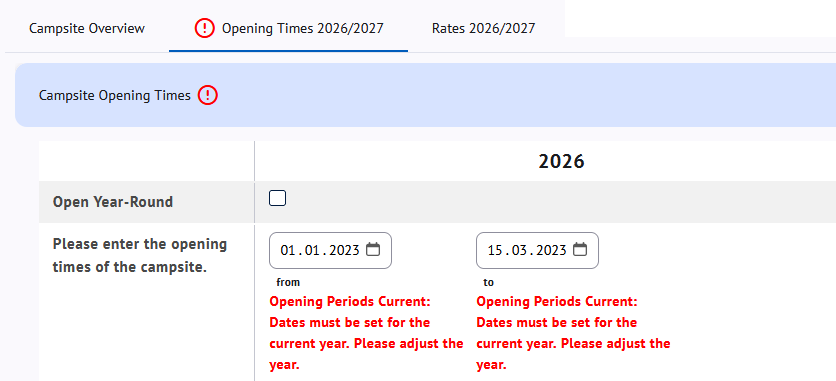
The examples below show how business decisions directly control form behavior.
The decision model defines which fields are required, editable and when validation rules activate.
The screenshots show the resulting UI state after CLE executes the decision model. The same approach can be applied to ERP systems, PIM systems, CRM platforms, CPQ solutions, customer portals and custom applications.
Example 1: No car-free area defined
Business Decision
When Car-Free Area = none
--> Additional details are not required
Resulting User Interface State

Example 2: Additional information becomes mandatory
In the second scenario, the business decision changes.
When part of the campsite is declared as a car-free area, additional information becomes mandatory. The UI adapts automatically, validation rules activate and missing information is highlighted immediately.
Business Decision
When Car-Free Area = part of the campsite
--> Location becomes mandatory
--> Validation rules are activated
Resulting User Interface State

CLE executes the decision model.
Applications consume the resulting UI decisions.
Return UI Decisions as Nested JSON
CLE does not prescribe a UI schema. Developers decide which decision objects, fields and property names their application requires.
CLE can return UI decisions as structured nested JSON. For example:
HTTP 200 OK

[{
  "ponyRiding": {
    "visible": true,
    "editable": true,
    "mandatory": true
  }
}]
The object name ponyRiding and properties such as visible, editable and mandatory are application-defined. CLE evaluates the decision model and returns exactly the attributes required by the consuming application.
Why UI Rules Become A Problem
Hard-Coded UI Logic Does Not Scale
Most applications eventually accumulate hundreds or thousands of UI rules.
Developers implement them in:
- React
- Angular
- Vue
- Java
- .NET
- TypeScript
Over time:
- rules are duplicated
- behavior becomes inconsistent
- changes require releases
- business users lose control
- updates break custom logic – vendor releases overwrite hard-coded rules
The problem is not the user interface.
The problem is where the decisions live.
With CLE, UI decisions live outside the application. Software updates do not affect decision models.
Excel As The Modeling Language
Business Experts Define UI Behavior
Business users already understand the rules.
They know:
- when fields become mandatory
- when fields become visible
- when data is complete
- when workflows can continue
CLE allows business experts to model business decisions in Excel and execute them through APIs. User interface behavior becomes one of many possible outcomes.
No custom rule language.
No frontend programming.
No application releases.
Learn how CLE exposes business decisions through a Decision Engine API consumed by applications.
Why Organizations Use CLE
Dynamic UI Decisions
Control visibility, editability and mandatory fields.
Consistent Behavior
Apply the same rules across applications.
Faster Changes
Update UI decisions without modifying application code.
Business-Controlled Logic
Allow business experts to maintain rules.
Explainable Decisions
Understand why a field became visible or mandatory.
Lower Technical Debt
Remove business logic from user interfaces.
For Software Vendors
Software vendors repeatedly build their own UI rule engines, validation frameworks and workflow logic for every product and every customer.
The challenge becomes even larger once applications allow customer-specific fields, customer-specific workflows and customer-specific validations.
As soon as customers can extend the data model, the associated business rules become customer-specific as well. Field visibility, mandatory fields, validations and workflow behavior can no longer be hard-coded into the product.
CLE acts as an external decision engine for user interface behavior, validations, workflow decisions and business rules.
Instead of implementing custom logic repeatedly across products, customers and services, decision models are maintained centrally and executed through APIs.
One Decision Model. Multiple Applications.
A single decision model can provide UI decisions for:
- PIM systems
- ERP systems
- CRM platforms
- CPQ solutions
- Customer portals
- Product configurators
- Custom applications
Every application receives the same decision outcome.
No duplicated UI logic.
No inconsistent behavior.
No endless customizations.
Keep The User Interface. Replace The Logic.
Applications render screens.
Business experts define behavior.
CLE executes the decisions.
Keep the application. Replace the hard-coded rules.