
Turn Excel Spreadsheets Into REST APIs
Maintain decision models in Excel. Use them everywhere through REST APIs.
CLE transforms Excel-based decision models into reusable REST APIs without embedding business logic into application code.
Instead of executing spreadsheets in production, CLE compiles Excel workbooks into executable decision models and exposes them through JSON-based APIs.
- Excel remains the modeling environment
- JSON business objects in, enriched business objects out
- No Excel runtime required
- Stateless and Docker-ready
- Built for pricing, scoring, classification and business rules
flowchart TB

EX["Excel Model"]
    A["CLE Contene Logic Engine"]
    B["REST APIs"]

    EX <==> A
    A <==> B
    B <==> E["ERP"] & F["PIM"] & G["CPQ"] & I["SaaS"]

    classDef Engine fill:#FFDFE5,stroke:#FF5978,color:#8E2236
    classDef Api fill:#C8E6C9,stroke:#4CAF50

    class A Engine
    class B Api

    linkStyle default stroke:#FFFFFF,stroke-width:3px
Why organizations want Excel models as APIs
Business logic changes constantly.
Discount structures evolve. Pricing rules are adjusted. Validation criteria are refined. Product classification models grow more sophisticated over time.
The applications that consume these decisions often change much more slowly. This creates a growing dependency between business decisions and software releases. Every modification of a pricing factor, discount rule or classification formula eventually requires developers to locate the implementation, change code, test the application and deploy a new version. The actual business change may take five minutes. The software change may take days.
By exposing decision models as APIs, the decision logic becomes an independent runtime component that can evolve separately from the applications that use it. Applications continue to manage data, workflows and user experiences while decision models can be updated independently.
Turning an Excel spreadsheet into an API allows organizations to separate business logic from application code.
CLE helps software teams turn Excel workbooks into REST APIs without rewriting formulas or business rules.
The challenge is that production systems should not depend on Excel itself. CLE takes a different approach. Instead of executing spreadsheets at runtime, CLE compiles the decision logic contained in an Excel workbook into an executable decision service that is exposed through REST APIs.
How to Turn an Excel Workbook into a REST API
CLE transforms an Excel workbook into a reusable REST API endpoint.
The process is intentionally simple from the perspective of both business experts and developers. Business experts continue to maintain decision logic in Excel using formulas, lookups, reference data, calculations and validation rules.
CLE analyzes the workbook and identifies all dependencies between inputs, intermediate calculations and outputs. Instead of executing spreadsheet cells at runtime, CLE compiles these dependencies into an optimized execution graph.
The resulting decision model is then deployed as a REST API.
- Applications submit business objects as JSON.
- CLE evaluates the decision model.
- The API returns the calculated decision results.
- The workbook remains the source code.
- The API becomes the runtime interface.
Excel Files That Can Become APIs
The concept is not limited to pricing.
Any decision model that can be expressed in Excel can be delivered as an API.
Typical examples include:
- Pricing API
- Discount API
- Rating API
- Scoring API
- Validation API
- Compliance API
- Classification API
- Configuration API
- Tax API
What all these scenarios share is that business experts define how decisions are made while applications consume the results.
Excel Is The Modeling Language
Many solutions advertise that they can execute spreadsheets through APIs.
CLE follows a fundamentally different architecture.
The goal is to expose the calculation model defined in Excel. Excel is simply used as the modeling language. Business experts already understand formulas, lookups, decision tables and reference data. Introducing another proprietary modeling language frequently adds complexity instead of removing it.
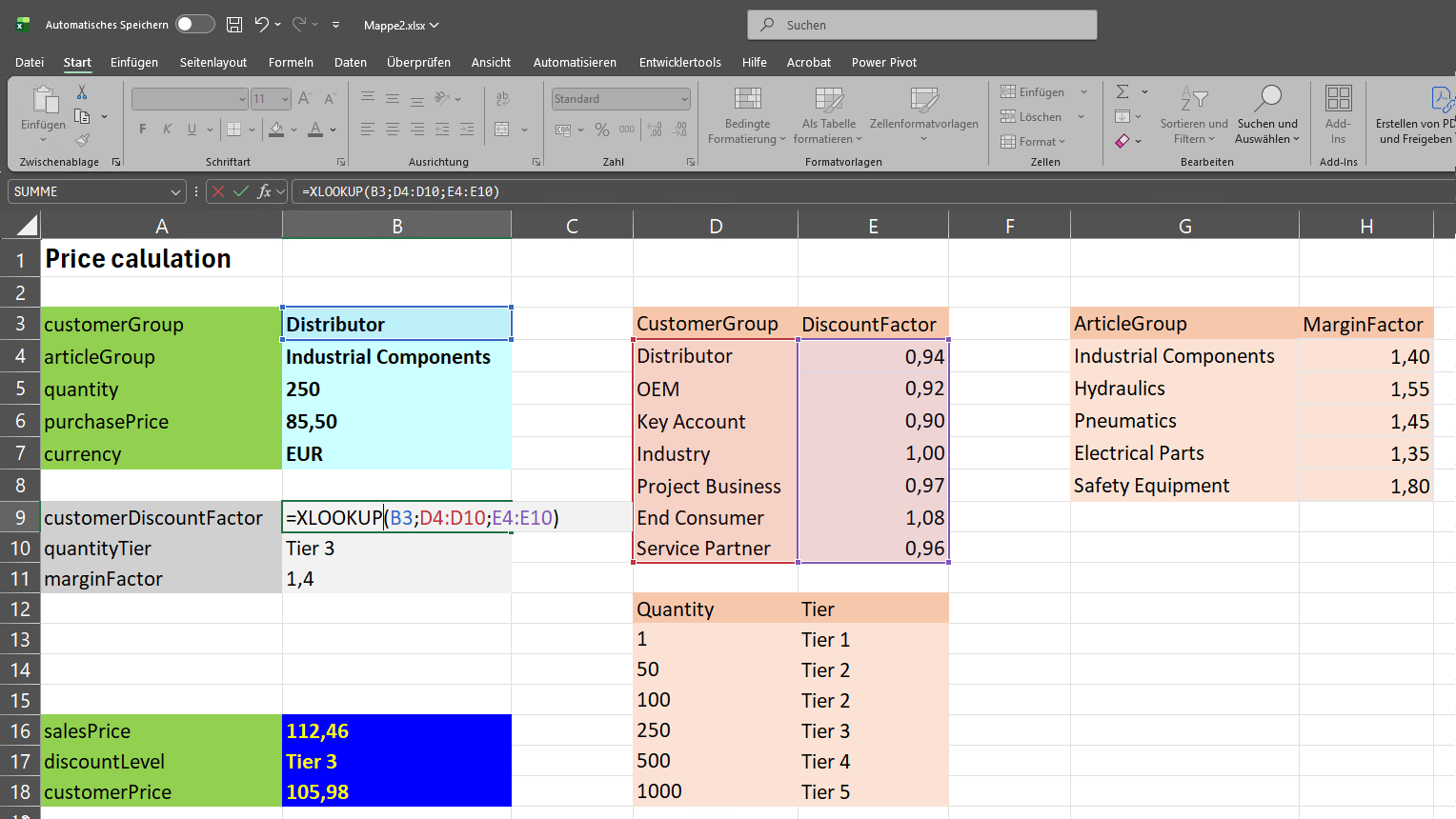
CLE therefore uses Excel as the authoring environment while the actual runtime executes a compiled dependency graph.
This distinction is important. The production system does not depend on Excel. The production system depends on an executable decision model derived from the Excel spreadsheet.
The Excel workbook is the source code.
The dependency graph is the executable artifact.
CLE does not transform spreadsheets into APIs. CLE transforms the decision logic contained in Excel files into reusable API services.
JSON In. JSON Out.
Applications interact with CLE through JSON-based APIs.
Existing business objects are submitted to the API and evaluated by the corresponding decision model.
Input
POST /api/decision
Content-Type: application/json

[{
  "country": "Italy",
  "weight": 205,
  "currency": "EUR",
  "requestedQuantity": 300,
  "purchasePrice": 1.35
}]
Output
HTTP 200 OK
(annotated for clarity)

[{
  "country": "ITALY",       // standardized
  "iso_code": "IT",         // added
  "weight": 205,
  "weightClass": "heavy",   // added
  "currency": "EUR",
  "requestedQuantity": 300,
  "purchasePrice": 1.35,
  "purchaseTier": 3,        // calculated
  "marginFactor": 1.81481,  // calculated
  "salesPrice": 2.45        // calculated
}]
Rather than transforming object structures, CLE typically enriches the incoming business object with additional attributes, classifications, calculations and decision outcomes.
This allows decision services to integrate naturally into existing architectures.
flowchart TB

    D["<b>Excel Workbook<br/>(Source Code)<br/></b>provided by Business Experts"]
    C["<b>CLE<br/>Decision Runtime</b>"]
    A["<b>Enterprise Applications</b>"]

    D ==> C

    A -->|"INPUT<br/><b>  Business Object   <br/>(JSON)</b>"| C
    C -->|"OUTPUT<br/><b>Enriched Business Object + Decision Result</b>"| A

    C:::Rose

    classDef Rose stroke-width:1px,stroke:#FF5978,fill:#FFDFE5

    style A fill:#E3F2FD
    style D fill:#FFF9C4,stroke:#D4AF37

    linkStyle 0 stroke:#D4AF37
    linkStyle 1 stroke-width:3px
    linkStyle 2 stroke-width:3px
- ERP systems remain ERP systems.
- PIM systems remain PIM systems.
- CPQ applications remain CPQ applications.
- CLE contributes decision logic without assuming ownership of application data.
Designed For Software Architects
Turning an Excel spreadsheet containing formulas into an API is not primarily a spreadsheet problem.
It is an architectural problem.
Organizations need a way to allow business experts to maintain decision logic while keeping applications maintainable, scalable and independent.
CLE introduces a dedicated decision runtime layer between business logic and application code.
This runtime layer allows decision models to evolve independently from the software systems that consume them.
Applications focus on processes and data.
Business experts focus on decisions.
CLE connects both worlds through APIs.
Related Topics
- Excel Pricing Models as APIs
- Decision Engine API
- Excel Rater API
- Scoring APIs
- Business Logic Decoupling
- Explainable Decision Services
Developers build applications. Business experts build decisions. CLE turns Excel workbooks, pricing models and business rules into reusable REST APIs.